Indstillinger
 Hurtig levering
 Gratis levering
 Incoterms
 Betalingstyper


 Markedspladsprodukt

Mfr varenr. 28009
EXPERIENTIAL ROBOTICS PLATFORM (
SparkFun Electronics

Single Board Computers Raspberry Pi SBC
In the previous tutorial in this series, we introduced the concept of TF2 in ROS 2 and how it allows robots to reason about spatial relationships using coordinate transforms between different frames. We built a basic broadcaster to send a transform from the world frame to the robot's frame using Turtlesim. In this tutorial, we take the next step and create a complete system using both TF2 broadcasters and listeners. Our goal is to have one turtle in the Turtlesim environment follow another turtle in real-time using TF2 transforms.
The Docker image and code for this series can be found here (including a C++ version of the TF2 examples): https://github.com/ShawnHymel/introduction-to-ros
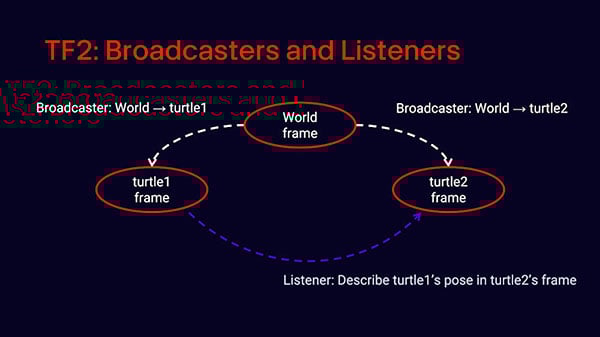
In ROS 2, TF2 manages a tree of coordinate frames over time. Each frame represents a different point of reference on your robot or in the environment. The TF2 library allows you to publish transforms between parent and child frames and query the transform between any two frames at a given point in time.
A broadcaster publishes a transform between two frames. It usually gets positional information from a topic or internal sensors and emits a transform message that describes the spatial relationship between a child frame and its parent. A listener subscribes to these transforms, stores them in a buffer, and allows nodes to query them at any time.
This model becomes essential in robotic applications like SLAM, where the robot must continuously update its pose in the world, or in multi-robot scenarios where each robot maintains its own local frame. By using TF2, you avoid hand-calculating coordinate transformations and instead rely on a robust, real-time framework that handles it all.
We begin by reviewing the broadcaster we wrote in the last tutorial. Every time Turtlesim publishes a pose message for a turtle, our broadcaster node takes that information and sends a TransformStamped message from the world frame to the turtle's frame. The pose contains x, y, and theta (heading), which we convert to a quaternion before broadcasting.
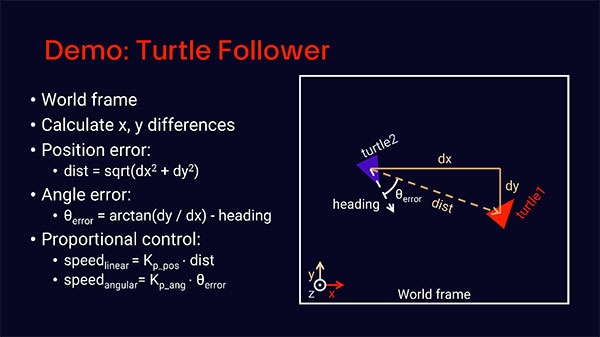
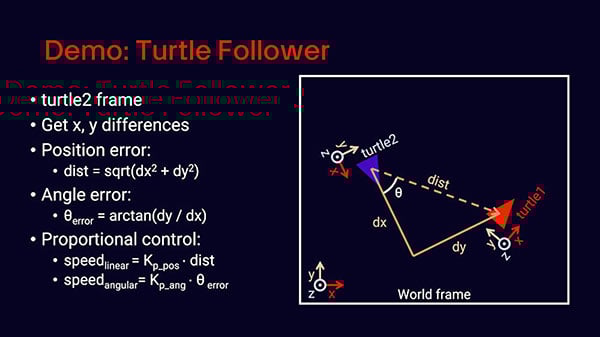
In our example, we want turtle 2 to follow turtle 1, so we need to figure out how to move turtle 2 toward turtle 1’s position. We will calculate the distance from turtle 2 to turtle 1 and the offset angle between turtle 2 and turtle 1. If we did this in the world frame, we could find the X and Y differences (dx, dy) and use the Pythagorean theorem to calculate the distance. We would then need to subtract the absolute heading of turtle 2 from the arctan(dy / dx) to get the angle offset.
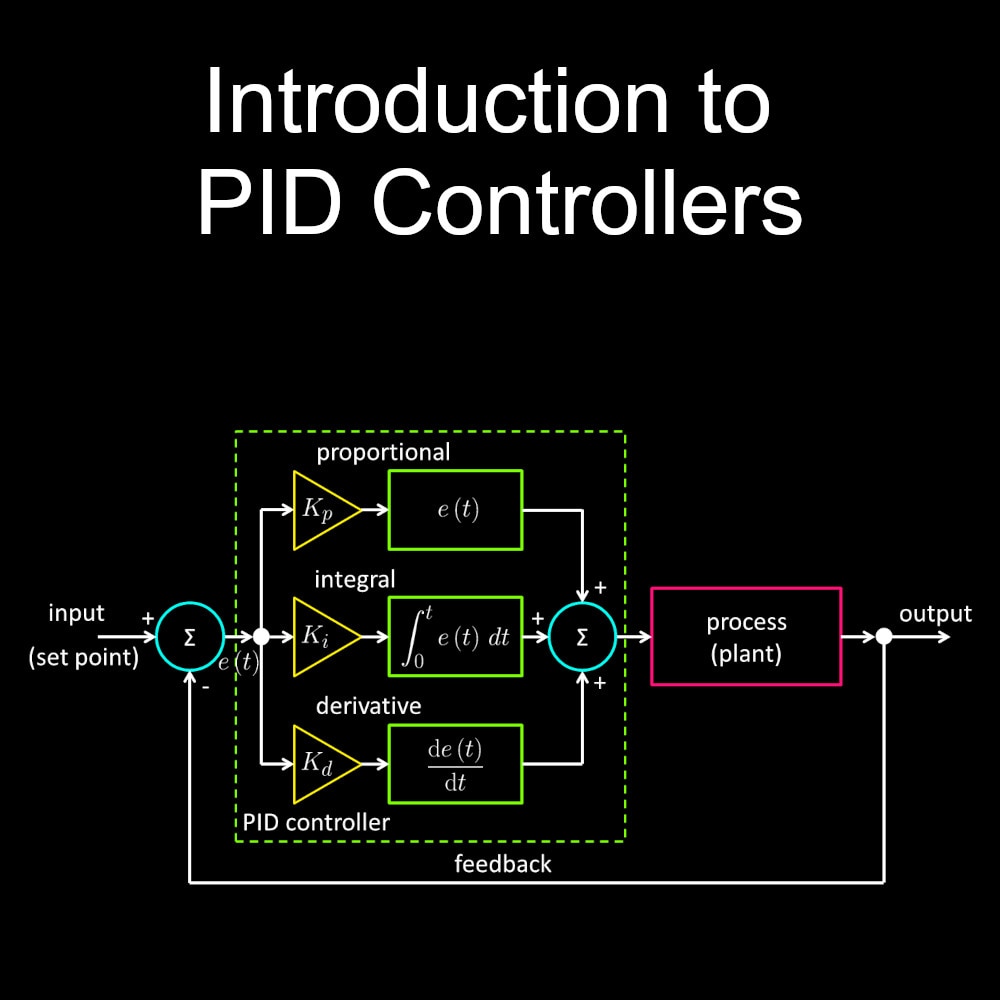
With that information, we can create a simple PID controller to move turtle 2 using the distance as “positional error” and offset angle as “angular error.” We can assume the proportional constants (Kp) have already been tuned. See this video for an in-depth explanation of PID controllers.
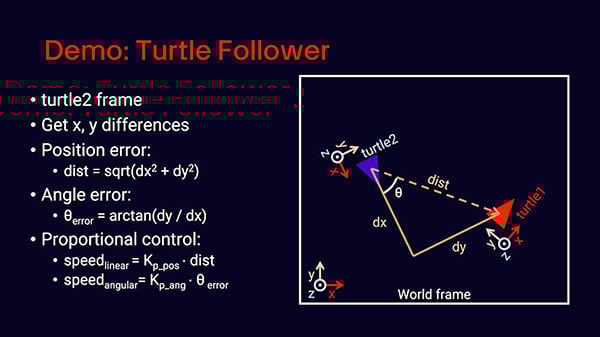
Now, let’s repeat the exercise using turtle 2’s frame of reference (instead of the world frame). The distance calculation is essentially the same, but we just use turtle 1’s X and Y position as the offsets (with the assumption that turtle 2 is at its own origin). The angle error is given by arctan(dy / dx), as we assume turtle 2 is always pointing down its own X axis (at least it does in Turtlesim).
We can use the same PID controller as before to control turtle 2. To get this information from turtle 2’s frame of reference, we can use transforms in the TF2 library. That requires writing broadcasters for turtle 1 and turtle 2 and utilizing a listener in turtle 2 to get the pose of turtle 1 in turtle 2’s frame. Yes, it’s more code, and the world frame calculations are easier, but this is a demonstration. Remember that TF2 can be scaled up to large, complex robots (think about manipulator arms with 4+ joints).
Let’s now create the listener. The node we’re going to write, TurtleFollower, will use a TF2 listener to get the pose of turtle1 in the frame of turtle2. With this information, it will compute how to move turtle2 to follow turtle1 using a simple proportional controller.
Here’s the code for the follower node (save as tf2_turtle_listener.py in the my_py_pkg package):
import math

import rclpy
from rclpy.executors import ExternalShutdownException
from rclpy.node import Node

from geometry_msgs.msg import Twist

import tf2_ros

class TurtleFollower(Node):
    """Uses TF2 listener to plot course and track main turtle"""

    def __init__(self):
        """Constructor"""
        super().__init__('turtle_follower')

        # Declare parameters
        self.declare_parameter('leader', "turtle1")
        self.declare_parameter('follower', "turtle2")
        self.declare_parameter('period', 0.1)

        # Set to attributes
        self._leader = self.get_parameter('leader').value
        self._follower = self.get_parameter('follower').value
        self._period = self.get_parameter('period').value

        # Create publisher
        self._publisher = self.create_publisher(
            Twist,
            f"/{self._follower}/cmd_vel",
            10
        )

        # Create TF2 listener
        self._tf_buf = tf2_ros.Buffer()
        self._listener = tf2_ros.TransformListener(self._tf_buf, self)

        # Periodically call the follow function
        self._timer = self.create_timer(self._period, self._follow)

        # Say we're started
        self.get_logger().info(
            f"Follower started: {self._follower} following {self._leader}"
        )

    def _follow(self):
        """Periodically steer the follower toward the leader"""

        # Attempt transform
        try:

            # Look up transform
            tf = self._tf_buf.lookup_transform(
                self._follower,
                self._leader,
                rclpy.time.Time()
            )

            # Figure out x, y difference and angle from leader
            dx = tf.transform.translation.x
            dy = tf.transform.translation.y
            angle = math.atan2(dy, dx)

            # Steer toward the leader
            twist = Twist()
            twist.linear.x = 2.0 * math.sqrt(dx**2 + dy**2)
            twist.angular.z = 4.0 * angle
            self._publisher.publish(twist)

        # If transform fails
        except Exception as e:
            self.get_logger().warn(f"Could not transform: {e}")

def main(args=None):
    """Main entrypoint"""

    # Initialize and run node
    try:
        rclpy.init()
        node = TurtleFollower()
        rclpy.spin(node)
    except(KeyboardInterrupt, ExternalShutdownException):
        pass
    finally:
        if node is not None:
            node.destroy_node()
        if rclpy.ok():
            rclpy.shutdown()

if __name__ == '__main__':
    main()
This node listens for transforms from the leader (turtle1) to the follower (turtle2) and drives turtle2 toward turtle1 using simple proportional control.
To calculate the twist message, we treat the leader turtle as a target and the follower turtle as a controller using a basic proportional-integral-derivative (PID) approach—though for simplicity, we use only the proportional (P) term here. The linear velocity (twist.linear.x) is proportional to the Euclidean distance between turtle2 and turtle1, calculated with the Pythagorean theorem. The angular velocity (twist.angular.z) is proportional to the angle between turtle2’s heading and the direction to turtle1, calculated using atan2(dy, dx). Because we’re computing everything in turtle2’s frame of reference, the heading of turtle2 is always aligned along the positive x-axis. This greatly simplifies the math, allowing us to steer directly based on the relative angle and distance. The gain values (2.0 for linear, 4.0 for angular) serve as proportional coefficients (Kp) to scale the correction—these can be tuned for smoother or more responsive following behavior.
Add the listener to setup.py:
'console_scripts': [
    ...
   "tf2_turtle_follower = my_py_pkg.tf2_turtle_follower:main",
]
Build:
colcon build --packages-select my_py_pkg
Start turtlesim nodes in separate terminals:
ros2 run turtlesim turtlesim_node
ros2 run turtlesim turtle_teleop_key
Start the broadcaster for turtle1:
source install/setup.bash
ros2 run my_py_pkg tf2_turtle_broadcaster
In another terminal, spawn turtle2:
ros2 service call /spawn turtlesim/srv/Spawn "{x: 2.0, y: 1.0, theta: 3.14}"
Start the broadcaster for turtle2:
source install/setup.bash
ros2 run my_py_pkg tf2_turtle_broadcaster --ros-args --param child:=turtle2
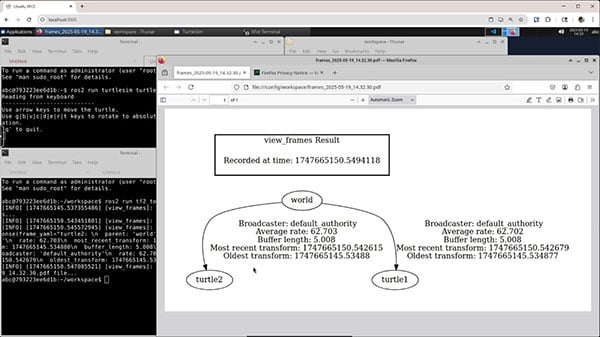
In a third terminal, visualize the transform tree:
ros2 run tf2_tools view_frames
Open the generated PDF to see how the frames are linked.
Run the follower node:
source install/setup.bash
ros2 run my_py_pkg tf2_turtle_follower
Drive turtle1 using the keyboard. Turtle2 should now follow it around!
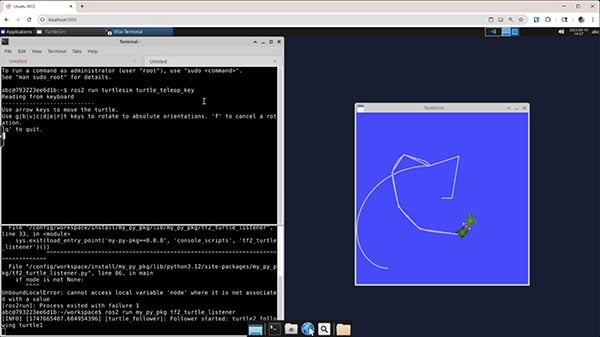
As a challenge, try extending this example into a turtle train. Spawn multiple turtles, each following the one in front of it using the same TF2-based follower logic. Each turtle will need its own frame and transform broadcaster, and each follower node should be configured to follow the appropriate leader. You should also maintain some distance (i.e., 1 unit) between each follower and its leader.
To make things easier to manage, create a bringup package that handles launching all the turtles, broadcasters, and listeners using a single launch file. This will reinforce your understanding of TF2, launch files, parameters, and ROS 2 package structure.
The solution for this challenge can be found in the series’ GitHub repo under turtle_train_bringup and turtle_train_pkg: https://github.com/ShawnHymel/introduction-to-ros/tree/main/workspace/src
TF2 is a foundational part of ROS 2 that enables spatial reasoning across multiple frames. In this tutorial, you learned how to use broadcasters to publish transforms and listeners to calculate relative positions between moving robots. With a simple proportional controller, we had one turtle follow another by calculating position and heading offset in the follower’s frame of reference.
Understanding how to use TF2 in practice is crucial for building more advanced robotics systems like manipulators, multi-robot fleets, and SLAM-based navigation. In the next episode, we’ll explore how to integrate ROS 2 with real hardware, bringing everything we’ve learned so far into the physical world.
Stay tuned!